Put BITCRUSH on the clip
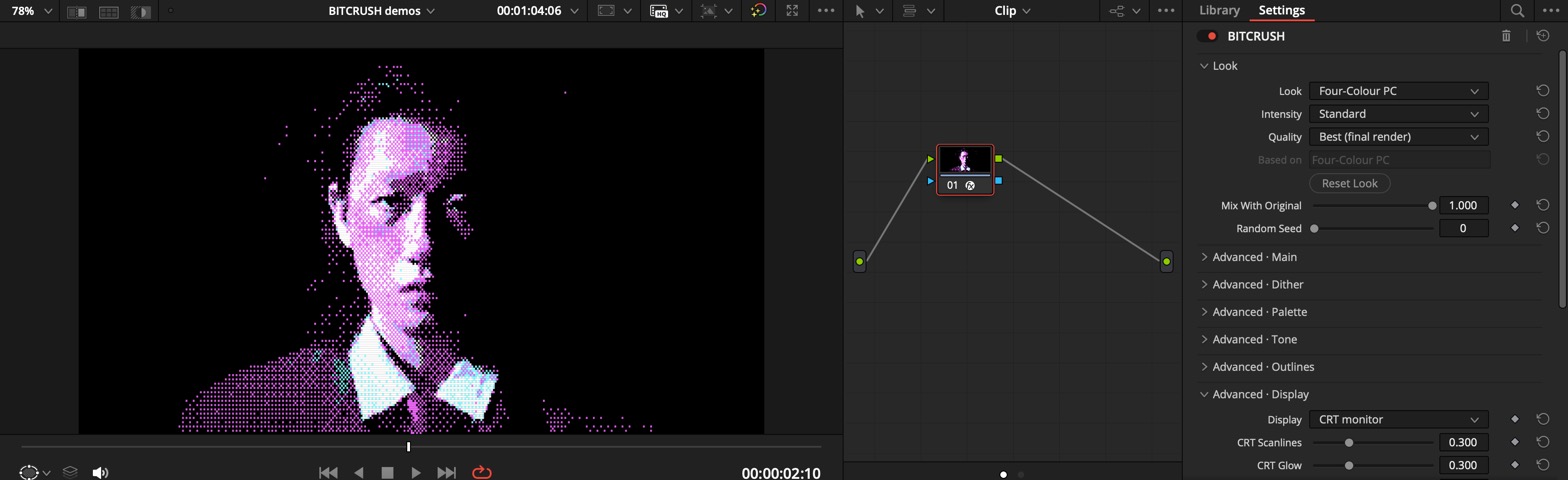
On the Color page, add a node to the clip, open Effects and drag BITCRUSH from Paperwolf Studio onto the node. Its settings open next to the node graph.
Pick a look
The Look menu has twenty looks, and most of them are a machine or a way of printing: a handheld, a nine-inch monochrome screen, a four-colour PC, a duotone zine, a morning paper. The last four are CRTs, which get their own chapter at the end.


The dither
These examples start from Four-Colour PC: black, cyan, magenta and white in tall pixels.
Pixel Size

In Advanced · Main. The size of one pixel of the crushed picture, in pixels of a 1080p frame. Small pixels keep the face, large ones turn it into a mosaic.
Method

In Advanced · Dither. How the missing tones are faked. There are fifteen methods. Ordered ones like Bayer (ordered) lay a fixed pattern over the picture and hold still on video. Error diffusion like Floyd-Steinberg and Atkinson follows the picture more closely and crawls as it moves. None (posterize) snaps every pixel to its nearest colour with no pattern at all.
Bayer Matrix

The size of the ordered pattern. A 2 x 2 matrix gives a coarse checker with few tones, a 16 x 16 one gives fine gradients.
Dither Strength

How much of the pattern is used. At 0 the picture falls into flat areas of the palette's colours.
Pixel Height / Width

The shape of a pixel. Old computers rarely had square ones, and Four-Colour PC uses 1.2 for the tall pixels of a 200-line screen.
The palette
Palette

In Advanced · Palette. Where the colours come from. The rows under the menu change with it: a library has a list, two colours have two swatches, and Auto from image finds the colours in your footage.
Library Palette

Twenty-five palettes taken from real hardware and print: handhelds, home computers, consoles, phosphor terminals, Riso inks and newsprint.
Light Color

With Palette on Two colors (1-bit), the picture is made of Dark Color and Light Color only. Any two colours work.
Gray Levels

With Gray / gradient levels, the number of steps between the dark and the light colour.
Auto Colors

How many colours BITCRUSH picks from the footage. Lock Auto Palette keeps them fixed for the whole clip, so the palette does not flicker from frame to frame.
Limit Colors Per Cell

Each cell of the picture may only use two colours of the palette, the limit that gave 1980s home computers their colour clash.
Tone and outlines
Contrast

In Advanced · Tone. A palette of four colours has very little room, so where the picture sits in it matters more than usual. Contrast decides how much of the frame falls to the darkest and the lightest colour.
Edge Outlines

In Advanced · Outlines. Draws the picture's edges as one-pixel lines in a palette colour. Edge Threshold sets how strong an edge has to be.
The display
Display

In Advanced · Display. What the crushed picture is shown on. None (pure palette) keeps the exact palette colours, the other three add the surface of a handheld screen, a tube or printed paper.
LCD Pixel Grid

The dark lines between the pixels of a handheld screen. LCD Shadow adds the soft shadow each pixel casts on the layer behind it.
Misregistration

On Print / Riso paper, each ink is printed slightly off the other, as on a real stencil print.
Paper Texture

The tooth of the paper under the ink. Ink Texture does the same for the ink itself.
Collage
Tiles Across

In Advanced · Collage. Collage Grid cuts the frame into tiles and dithers each one differently: another method, another pixel size, another tone.
Re-roll Every N Frames

With Re-roll Tiles on Every N frames, the tiles are dealt again on a fixed beat. On the beat (BPM) ties it to a tempo instead.
A CRT as the last touch
The four CRT looks keep the picture in full colour and put it on a tube with a phosphor mask, scanlines and glass. Use one on its own, or add it on a second node after any other look, the way a finished picture ends up on a screen.
Look

Four tubes. Tube Close-Up is a colour CRT filmed from very near. Living Room TV is a consumer set on a composite cable with a slot mask. Broadcast Monitor is a studio monitor with an aperture grille, sharp with deep gaps between the lines. Arcade Cabinet is a big low-resolution tube with a coarse dot mask.
CRT Scanlines

In Advanced · Display. The dark gaps between the lines the beam draws. The beam widens on bright lines, so highlights close the gaps and shadows open them.
CRT Phosphor Mask

The red, green and blue phosphors the picture is made of. At 0 the tube has scanlines only. CRT Mask Type picks stripes, slots or dots.
CRT Mask Pitch

The size of one phosphor triad. A large pitch is a screen seen from very close, a small one is a screen seen from across the room.
CRT Bloom

Bright areas swell and spill into their neighbours. CRT Halation adds a wider glow inside the glass.
CRT Curvature

The bulge of the glass, with the rounded corners that come with it.
A tube on a second node
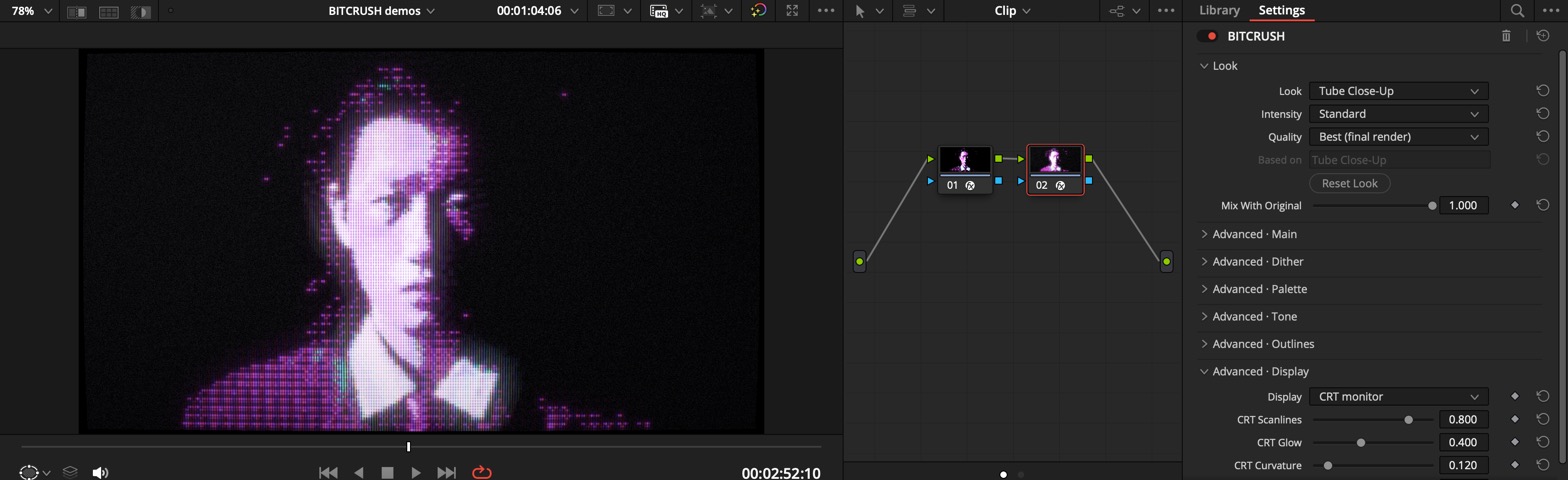
Add a node after the first with Add Serial Node and drag BITCRUSH onto it as well. The first node makes the picture and the second one shows it on a tube. Here the first is Four-Colour PC and the second is Tube Close-Up.
Mix With Original

On the second node it fades the tube in over the first node's picture. At 0 you see Four-Colour PC exactly as it leaves the first node.
The look under the tube

Any look can feed the tube. The second node stays as it is and only the first one changes.
FAQ
Does BITCRUSH work in the free version of DaVinci Resolve?
Yes, in the free version and in Studio, on macOS.
Does the dither flicker on video?
Ordered methods and blue noise hold still, because the pattern is fixed to the frame. Error diffusion moves with the picture, which is part of its character. Animate Pattern changes the pattern on purpose, every frame or every few frames.
Can I use my own colours?
Yes. Set Palette to Custom swatches for up to eight colours, or to Hex list (paste) and paste a list of hex codes.
Can I use the CRT without any dithering?
Yes. The four CRT looks keep the picture in full colour, so the tube is the only thing they add. On a second node the same tube goes over any other look.
Can I keyframe the controls?
Yes. Every slider has a keyframe button on the Color page.
Get BITCRUSH
BITCRUSH has twenty looks, fifteen dithering methods, twenty-five palettes and 93 controls under them, with LCD, print and CRT displays to finish on. The trial has every feature with a watermark and no time limit, so you can try it on your own footage first.